


ComEd
4.05.85K Reviews
App Specs
- Version
- 26.2.0
- Updated On
- License
- Free
- Downloads
- 500,000+
- Developer
- An Exelon Company
- Categories
- Business
- Platform
- Android, iOS
Screenshots
 Analysis by AppCompare
In a shared home, an electricity question can land with whoever happens to be holding a phone: “Can you check whether we need to do anything about the account?” I find that kind of quick check is where ComEd makes most sense. It gives existing customers a mobile way to reach their utility account, which can be more convenient than waiting until someone is back at a computer. The useful part is not simply having an app installed; it is being able to check the right account, then pass along a clear answer.
That household angle also sets a sensible boundary. The app is useful for someone connected to a ComEd account, but it should not be treated as a shared household control center. Before using it, I would decide who is responsible for signing in and who should receive updates. That keeps a convenient account check from turning into confusion about who is authorized to act or which service address is being discussed.
ComEd is a free business app from An Exelon Company, with an Everyone content rating. It is available for Android devices running Android 7.0 or later, and its current version is 26.2.0. It has been available since April 18, 2012; more than 500 thousand people have installed it, and its average rating is 4.0 from around 16 thousand ratings. Those figures suggest it is an established option, though the right reason to install it is still straightforward: you use ComEd and want account access on your phone.
Following a bill from the first check to the final decision
I’ll start with the bill-checking routine, where the app is most useful as a way to verify account details before anyone makes a decision. From there, I’ll look at how a household can keep responsibilities and account access clear, so a quick check leads to a dependable next step.
Starting with the right question
The first useful thing about ComEd is that it begins with the account rather than with general information. If I am standing in a kitchen with a bill open on the counter, my immediate question is normally practical: what do I owe, what is happening with the account, and what should I do next? A dedicated account app is more direct than searching through a general browser, especially when I am checking from a phone.
This makes the app most suitable for existing ComEd customers. It is not a general energy-learning tool, a comparison service, or a household budgeting app. Its purpose is narrower and more useful: giving customers a mobile route to their ComEd account information. That narrow focus is a strength when I need a quick account check, but it also means I would not install it expecting advice about changing suppliers, comparing electricity plans, or managing unrelated household services.
Before relying on it during a busy moment, I would make sure I know which account credentials belong to the service address I want to manage. That small preparation matters in shared homes, rental properties, and family situations where one person may pay while another handles day-to-day account questions. The app can make access easier, but it cannot remove the need to identify the correct account.
Worth Reading Before You Choose

EA SPORTS FC Mobile 26 Is a Bigger Football Game, but It Takes Time

Flipboard Shows What News Apps Must Do Beyond the Feed

Switching to Android Auto Means Rethinking Your Driving Routine

Google Calendar Makes a Crowded Week Easier to Manage

Ludo King Makes the Most of the Minutes Between Plans

Baby Panda World Brings Quick Play to Modern Phones, but Its Game Library Feels Busy
Moving through the account instead of hunting for information
Once I open the app, the useful workflow is to treat it as a sequence rather than tapping around at random. I start by reaching my account area, then look at the current information before deciding whether I need to take action. This order helps separate two things that are easy to confuse: understanding the account and completing a task.
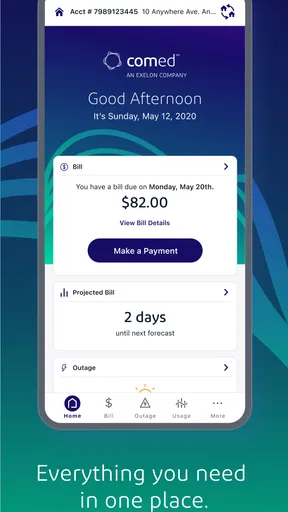
For a normal monthly check, I would first review the displayed account details and bill information. I would then pause before acting, particularly if the amount looks different from what I expected. A mobile screen encourages quick taps, but a utility account deserves a short verification step. I want to confirm that I am looking at the right service account and that I understand what the displayed balance represents before handing the phone to someone else or proceeding.
The most useful habit is to use ComEd as a checkpoint, not merely as a payment shortcut. Checking the account first gives me a chance to notice an unexpected change, an issue requiring attention, or a mismatch with the household record. That is more valuable than opening the app only when a deadline is already close.
In a realistic household scenario, I might receive a reminder from my partner that the electricity bill needs handling while I am away from my computer. I can open ComEd, review the account information, and report back with a clear answer instead of sending a vague message such as “I think it is fine.” If the account requires action, I can tell the other person what I found and who will take the next step. The app’s value here is not just access; it reduces the number of handoffs that depend on memory.
Handling the handoff between people
Utility accounts often have an awkward division of responsibility. One person may be named on the account, another may monitor household spending, and a third may be responsible for checking service information. ComEd works best when everyone agrees on that arrangement before a problem appears.
If I am the account holder, I would avoid passing my login details around casually. Instead, I would use the app to inspect the information myself and communicate the relevant result. That creates a cleaner handoff: I verify the account, explain what needs doing, and let the responsible person decide whether to continue. It also lowers the chance of someone acting on the wrong service address or misunderstanding a screen viewed without context.
This is one of the less obvious benefits of a dedicated utility app. The app does not replace household communication, but it gives the conversation a concrete starting point. Rather than arguing over whether a bill arrived or whether an account is current, I can check the account and discuss the result. For families, roommates, and people helping an older relative, that can be more useful than another generic finance app that has no direct connection to ComEd.
There is a trade-off, however. A mobile account tool is convenient for the person who has access, but it does not automatically solve shared-account organization. If several people need independent control, or if the account arrangement is complicated, the usual browser-based account process or direct customer support may be a better route for sorting out responsibilities. ComEd is strongest as a personal access point, not as a household collaboration system.
Reaching an outcome without losing the context
The outcome I want from the app is simple: I know the current account situation and can take the appropriate next step. That might mean recording the information for the household, continuing with the available account task, or deciding that the issue needs a different channel. The app earns its place when it gets me to that decision faster than opening a laptop or searching for the correct ComEd page.
I also like the possibility of checking information while away from home. A utility question can arise during travel, at work, or while helping someone who is not comfortable managing an online account. A phone-based route is naturally better in those situations than waiting until I return to a desktop. The app’s free price removes a separate purchase decision, so the practical question is mainly whether I already need ComEd account access.
Still, I would not treat a successful account check as proof that every related issue is resolved. A displayed account status and a completed household workflow are not always the same thing. If another person is responsible for the next action, I would send them a short written summary and note what remains to be done. That simple handoff prevents the common failure where everyone assumes someone else handled the bill.
Where the mobile workflow starts to break
The biggest limitation is the app’s narrow purpose. Because ComEd is tied to one utility provider, it cannot become a single dashboard for all household bills. Someone managing several properties, different energy providers, or a detailed monthly budget will probably prefer a broader finance tool alongside the app. A general budgeting app is better for seeing the full household picture; ComEd is better for reaching the ComEd account itself.
The second friction point is the small-screen environment. Phone access is convenient, but account information can be easier to interpret on a larger browser window, particularly when I am comparing several details or helping another person follow along. If the task becomes complicated, switching to the normal web route may be more comfortable. The app should save time for routine access, not force every situation into a mobile interface.
There is also a practical dependency on account access. If I cannot sign in, have forgotten which credentials apply, or am dealing with an account that does not belong to me, the app cannot magically complete the workflow. In those cases, the right move is to use ComEd’s account-recovery or customer-service route rather than repeatedly trying random details. A dedicated app is convenient only after the account relationship is clear.
Another point worth keeping in mind is that a utility app is not the best place to investigate every unusual charge or service concern. If the information raises a question that needs explanation, I would use the app to gather the relevant account context and then move to the appropriate ComEd support channel. That two-stage approach is more realistic than expecting a compact account app to provide a full conversation about a complicated case.
Who should use it, and who should choose something else
I would recommend ComEd to customers who regularly need mobile access to their ComEd account and want a direct alternative to opening a browser. It is especially practical for people who check bills while commuting, manage a household from a phone, or need to confirm account information before coordinating with a partner, roommate, or family member.
It is also a sensible choice for someone who only needs one utility account in a mobile format. The free app is easy to justify when it replaces repeated browser searches and keeps the account route close at hand. Its Everyone content rating also makes it suitable for general household use, although the account holder should still decide who is allowed to manage account information.
I would skip it as a primary tool if I need a complete personal-finance system, a multi-provider bill organizer, or detailed spending analysis. In that situation, a budgeting app or a browser-based workflow may be more useful, with ComEd kept as the provider-specific access point. I would also choose the web route first if I am handling a complex account issue that benefits from a larger screen or more room to compare information.
My practical verdict after using the full workflow
ComEd succeeds because it addresses a very specific inconvenience: needing to reach a ComEd account when a computer is not nearby. From the initial account check to the conversation with the person responsible for the next step, it can make a routine utility task feel less scattered. Its best use is not constant browsing but quick, deliberate checks that lead to a clear household decision.
The app is not a replacement for every ComEd support path, and it is not designed to manage an entire financial life. That is important to accept before installing it. When the question is account-specific and time matters, the mobile format is genuinely helpful. When the question involves several providers, detailed budgeting, or a complicated explanation, another tool or a larger-screen route will usually be better.
With a 4.0 average and thousands of customer reviews, ComEd sits in the useful-but-not-universal part of the utility-app category. My recommendation is straightforward: if you are a ComEd customer and want your account information available on the go, it is worth trying. Use it as the first step in a complete workflow, verify what you see, communicate the result clearly, and switch to a broader or more direct alternative when the issue goes beyond routine account access.
A practical routine for a shared household
For a recurring household check, I would keep the routine simple: the account holder reviews the app, notes what needs attention, and sends the other bill-payer a concise summary. If the amount or status surprises us, we pause and confirm the service address and account context before making a decision. This is a useful way to avoid turning a quick phone check into an assumption that the right bill was reviewed.
That approach is especially helpful when the person who pays is not the person who notices the bill. A roommate can flag that it is time to check, while the account holder verifies the details and confirms who will follow through. The app supports that coordination by making the account easier to reach, but the actual division of responsibility still belongs to the household.
My recommendation is to treat account access and household authority as separate things. A relative may be able to help interpret a bill without needing the account credentials, and a person who has the credentials may not be the one responsible for payment. Keeping those roles clear is more dependable than sharing a sign-in simply because several people live with the same service.
For anyone deciding whether to install it, the key question is not whether a phone app is always better than a browser. It is whether quick access to this particular utility account solves a recurring hassle. If it does, ComEd is a reasonable, focused tool; if the real need is consolidated household budgeting or shared management across providers, a broader option should remain the main workspace.
Pros
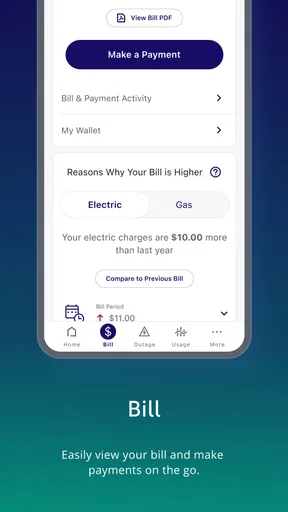
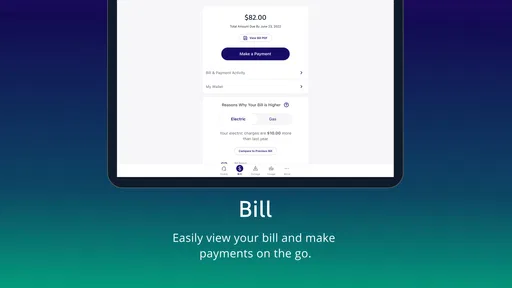
- Quickly view current and past ComEd bills in the app.
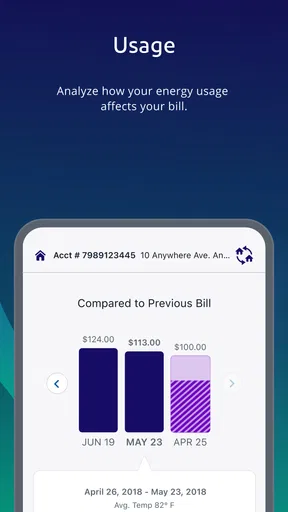
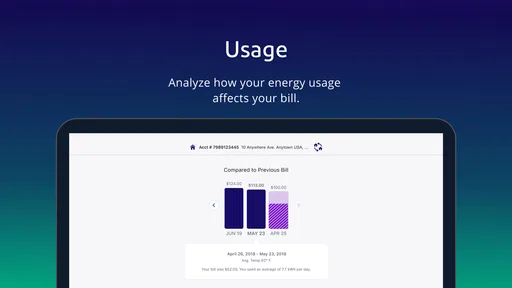
- Usage history helps identify changes in electricity consumption.
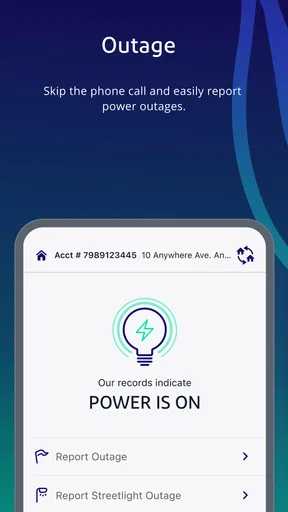
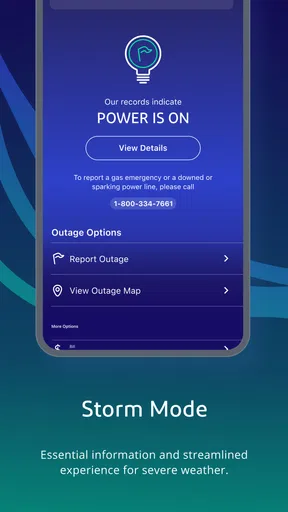
- Outage reporting can be completed directly from your phone.
- Payment options support convenient bill management while traveling.
- Account alerts can help users stay informed about service updates.
Cons
- Some features require a registered ComEd account and login.
- Outage information may take time to reflect the latest local status.
- Payment processing can depend on third-party banking services.
- App usefulness is limited for customers outside the ComEd service area.
- Occasional updates or maintenance may temporarily affect availability.
FAQs for ComEd
What is the ComEd app used for?
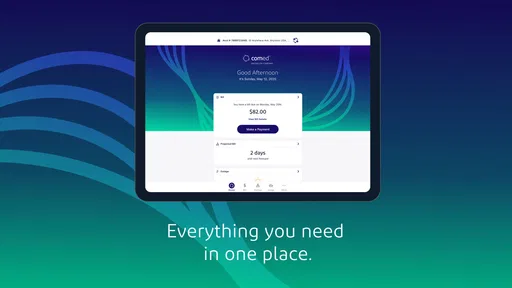
The ComEd app is designed for customers of Commonwealth Edison to manage their electricity account from a mobile device. After signing in, you can review your balance, pay bills, view usage information, manage account details, and report or check the status of outages. It brings many routine account tasks together without requiring you to use the full website.
Can I pay my ComEd electricity bill through the app?
Yes, the app generally allows eligible ComEd customers to view their current bill and make a payment using an available payment method, such as a bank account or card, depending on the options supported for the account. Before confirming a payment, carefully review the amount, processing date, and any displayed fees. Payment availability can vary by account status and location.
Does the ComEd app provide real-time outage information?
The app can help you report an outage and check outage information associated with your service address. It may display restoration updates, estimated restoration times, or broader outage details when information is available. However, conditions can change quickly during severe weather, so an estimate is not a guarantee. For immediate danger, such as downed power lines, contact emergency services instead.
Is the ComEd app free to download and use?
The ComEd app is typically free to download from the official Android or iOS app store, and ComEd does not normally charge a separate fee simply for accessing account-management features. Nevertheless, your mobile carrier may apply data charges, and certain payment services or account transactions could have their own terms. Always verify the publisher before installing to avoid unofficial copies.
Is the ComEd app safe, and what information do I need to sign in?
The official ComEd app is intended to protect account access through standard login and security measures, but users should still install it only from an official app store and keep the application updated. Sign-in commonly requires your ComEd account credentials, and some features may request verification information. Avoid sharing passwords, review permissions, and use a secure connection when managing billing details.


